> ## Documentation Index
> Fetch the complete documentation index at: https://developer.karmacheck.com/llms.txt
> Use this file to discover all available pages before exploring further.
# Migrating your webhooks to the new infrastructure
> How to migrate your KarmaCheck webhooks to the new delivery system, verify signatures, and switch over safely.
We're moving webhook delivery to a new system that's more reliable, easier to monitor, and more secure. This guide walks you through the migration from the **Webhooks** page in your KarmaCheck dashboard.
The migration is non-destructive and reversible at every step. You can stop, verify, and continue at your own pace. There is no time pressure.
## What you'll get
* **More reliable delivery**, with automatic retries when your receiver is slow or briefly unavailable.
* **More robust delivery logs** in the dashboard showing every event, its status, and its response — so you can see exactly what was sent and what came back.
* **Stronger event signing** so your receiver can verify each event genuinely came from KarmaCheck.
* **Multiple endpoints**, allowing for more flexability when setting up event receivers.
## What stays the same
* Your existing webhook URLs.
* The events you're subscribed to.
## What changes
**If your receiver validates incoming webhooks today — with the legacy `karmacheck-signature` HMAC or with username/password — you'll need to update that code before cutover.** The new system signs requests differently and issues a brand-new signing secret, so verification written for the legacy system will reject every event from the new system. If you don't validate today, nothing will break, but we recommend adding verification (see [Verifying signatures](./webhooks-overview#verifying-signatures)).
The new system uses **HMAC-SHA256 signature verification** with a per-endpoint signing secret, delivered through industry-standard `webhook-*` headers. This is *not* the same as the legacy `karmacheck-signature` HMAC — the headers, the signed content, the encoding, the timestamp units, and the secret itself all change. The table below shows exactly what differs.
| | Legacy | New |
| ----------------------- | --------------------------------------- | ------------------------------------------------------------------- |
| **Signature header(s)** | `karmacheck-signature: t=,v1=` | `webhook-id`, `webhook-timestamp`, `webhook-signature: v1,` |
| **Signed content** | `.` | `..` |
| **Signature encoding** | hex | base64 |
| **Timestamp units** | milliseconds | seconds |
| **Signing secret** | per-endpoint secret (no prefix) | **new** per-endpoint secret, `whsec_…` format |
| **Authentication** | username/password in the JSON body | removed — signature only |
| **`User-Agent`** | `KarmaCheck WebHook 2.0` | `Svix-Webhooks/…` |
Here are the two request shapes side by side:
```http Legacy request theme={null}
POST /webhook-endpoint HTTP/1.1
Connection: close
Host: example.com
Content-Length: 1902
User-Agent: KarmaCheck WebHook 2.0
Content-Type: application/json
Accept: application/json, text/plain, */*
karmacheck-signature: t=1780927177000,v1=83f9...e1b4
```
```http New request theme={null}
POST /webhook-endpoint HTTP/1.1
Host: example.com
Content-Length: 1902
User-Agent: Svix-Webhooks/1.84.0
Content-Type: application/json
Accept: */*
webhook-id: msg_3ErCD0YuVlJPXMDLSUg3PpMJGN5
webhook-timestamp: 1780927177
webhook-signature: v1,IMc336RAKV7xItISRHppXKlcGlyPW2kC1xwG/jOPB4g=
```
Legacy endpoints with username/password authentication will be clearly marked.
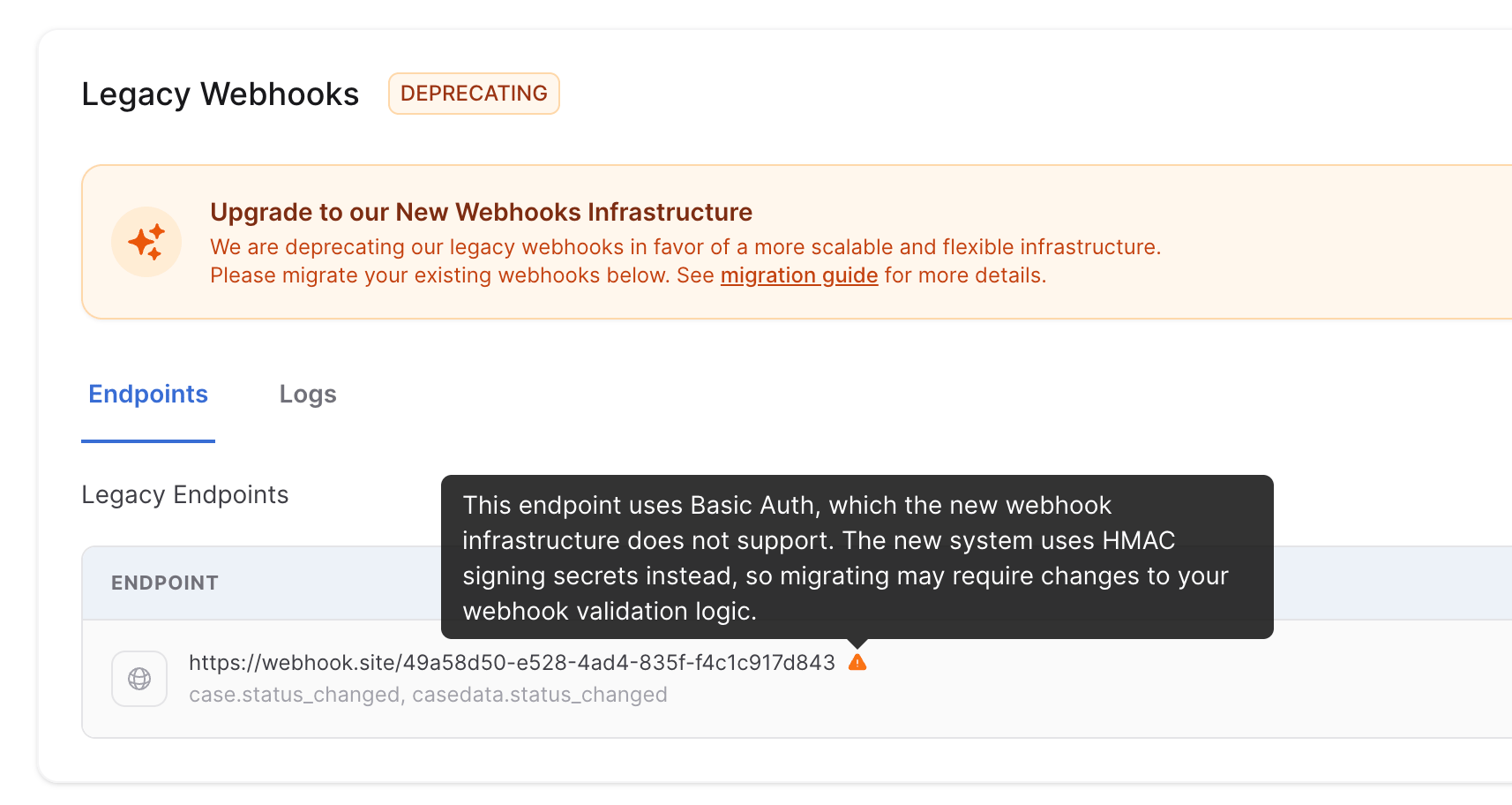 **The signing secret is new — it is not carried over.** Migration generates a fresh signing secret for each endpoint in the new system. Your old secret will not verify new-system signatures. Copy the new `whsec_…` secret from each endpoint's detail view in the dashboard and update your receiver's configuration before you turn the new delivery on.
**Not verifying signatures today?** The new system is the right time to start. Verifying confirms each event genuinely came from KarmaCheck and hasn't been tampered with in transit. We strongly recommend adding verification using the ready-to-use sample in [Verifying signatures](./webhooks-overview#verifying-signatures).
## Migration overview
During the migration, your Webhooks page shows two panels — the **legacy** webhooks and the **new** webhooks — each with its own on/off switch. The two switches are independent, which lets you safely run both systems in parallel before fully switching over.
**The signing secret is new — it is not carried over.** Migration generates a fresh signing secret for each endpoint in the new system. Your old secret will not verify new-system signatures. Copy the new `whsec_…` secret from each endpoint's detail view in the dashboard and update your receiver's configuration before you turn the new delivery on.
**Not verifying signatures today?** The new system is the right time to start. Verifying confirms each event genuinely came from KarmaCheck and hasn't been tampered with in transit. We strongly recommend adding verification using the ready-to-use sample in [Verifying signatures](./webhooks-overview#verifying-signatures).
## Migration overview
During the migration, your Webhooks page shows two panels — the **legacy** webhooks and the **new** webhooks — each with its own on/off switch. The two switches are independent, which lets you safely run both systems in parallel before fully switching over.
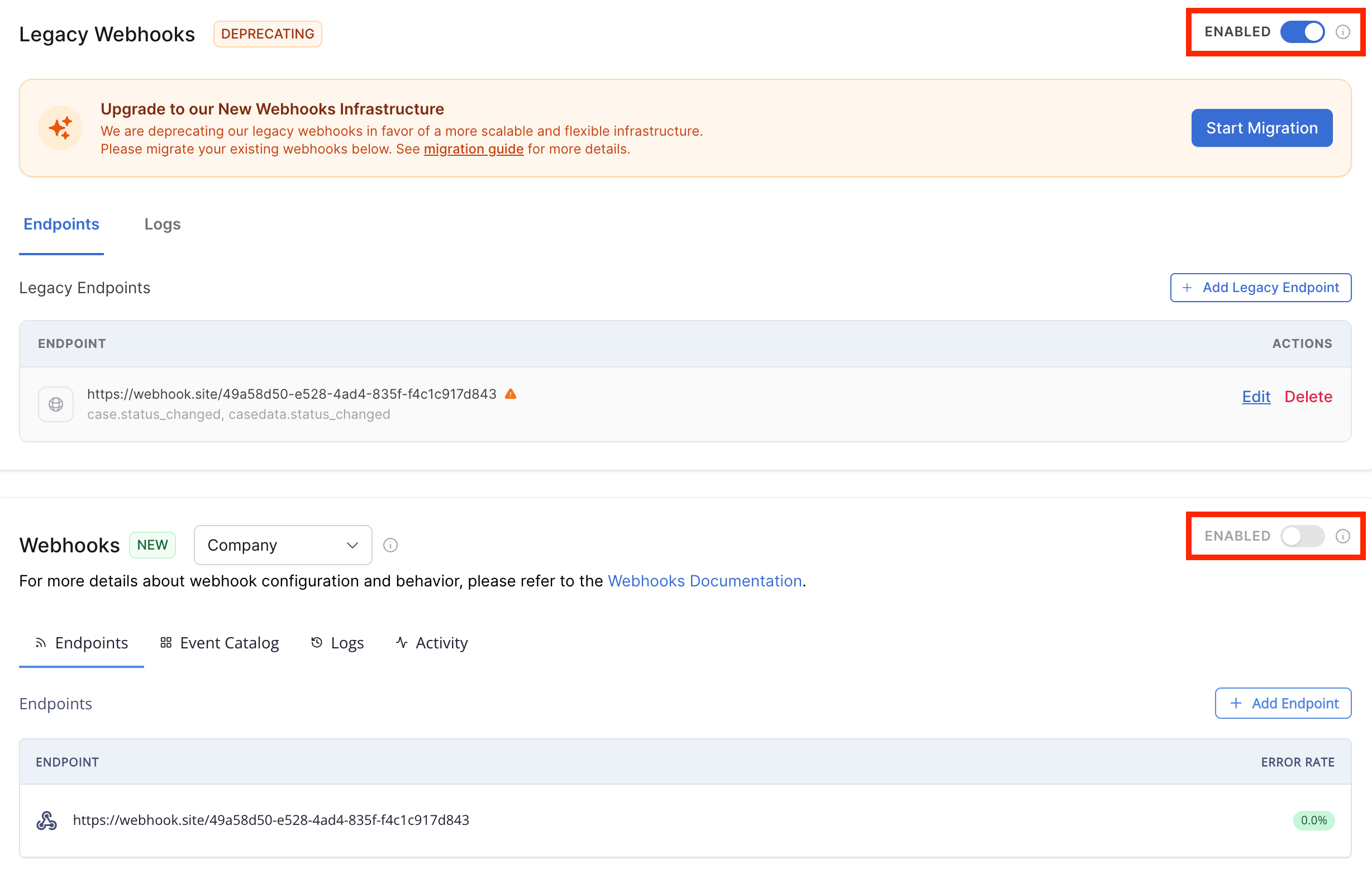 The recommended sequence is:
1. Copy your endpoints into the new system.
2. Turn the **new** system on while **legacy** is still running. Your receiver will get every event twice — once from each system. This is the verification window.
3. Confirm everything looks right.
4. Turn the **legacy** system off.
You can leave both systems running for as long as you want before cutting over, just make sure your system can gracefully handle duplicate messages when publishing from both systems.
## Migration steps
### 1. Open the Webhooks screen
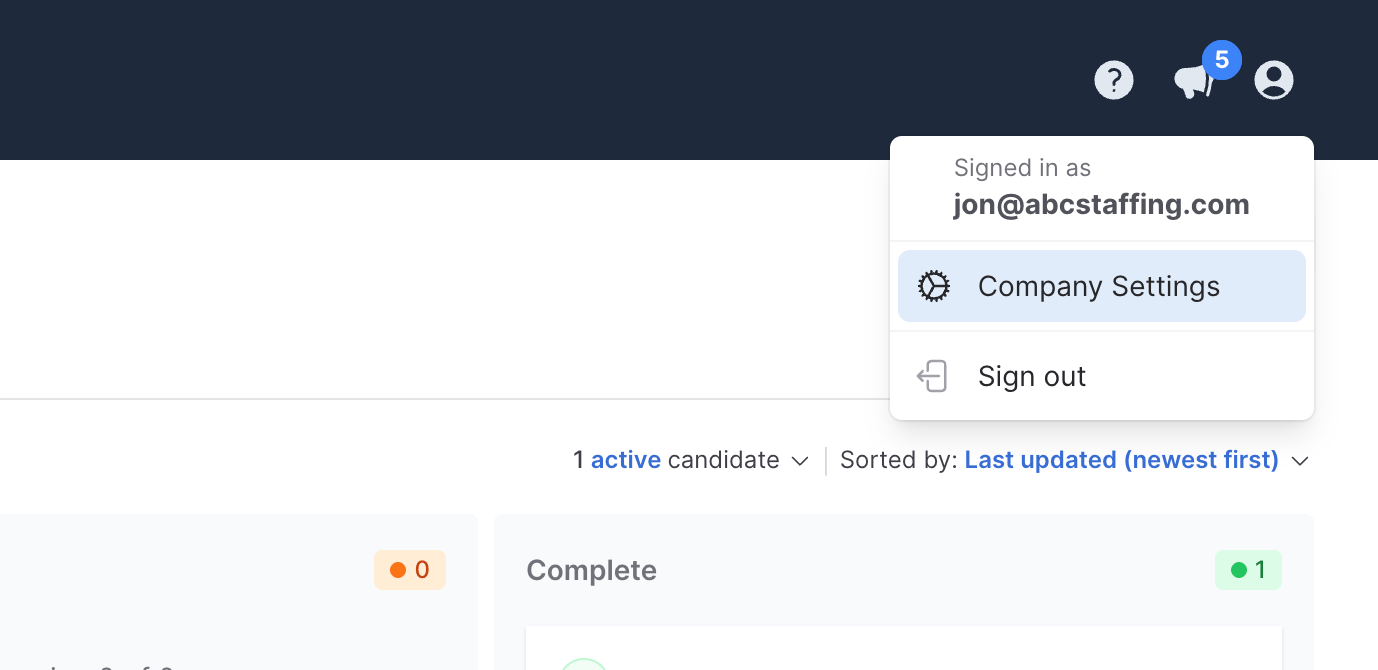
Go to the **Company Settings** page, found in your Profile dropdown, and navigate to the **Webhooks** tab.
The recommended sequence is:
1. Copy your endpoints into the new system.
2. Turn the **new** system on while **legacy** is still running. Your receiver will get every event twice — once from each system. This is the verification window.
3. Confirm everything looks right.
4. Turn the **legacy** system off.
You can leave both systems running for as long as you want before cutting over, just make sure your system can gracefully handle duplicate messages when publishing from both systems.
## Migration steps
### 1. Open the Webhooks screen
Go to the **Company Settings** page, found in your Profile dropdown, and navigate to the **Webhooks** tab.
 ### 2. Start the migration
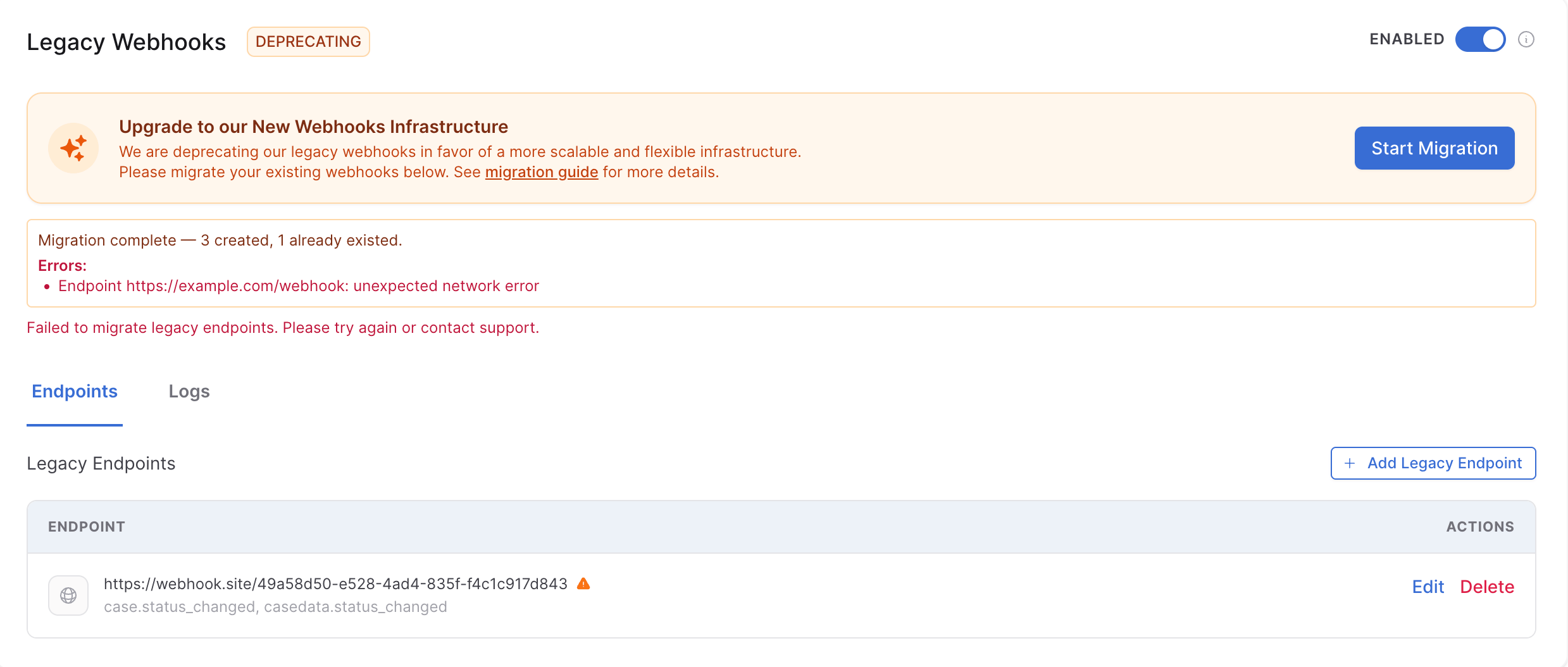
You'll see a banner inviting you to upgrade. Click **Start Migration**.
### 2. Start the migration
You'll see a banner inviting you to upgrade. Click **Start Migration**.
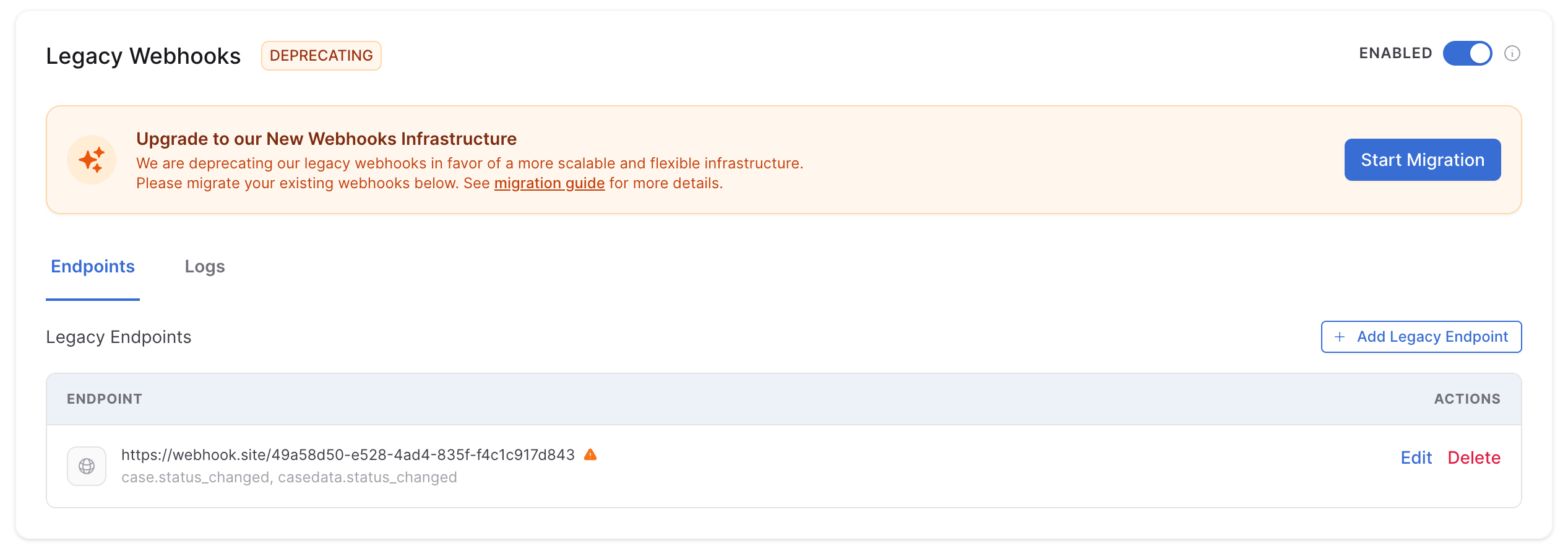 This copies your existing webhook endpoints into the new system. Nothing is deleted, and no delivery has changed yet — your old webhooks continue to receive events exactly as before.
If the migration reports any errors, **stop here** and contact support.
This copies your existing webhook endpoints into the new system. Nothing is deleted, and no delivery has changed yet — your old webhooks continue to receive events exactly as before.
If the migration reports any errors, **stop here** and contact support.
 ### 3. Update signature verification
**This step is required for every endpoint, not just former username/password users.** Update your receiver to:
1. **Read the new headers** — `webhook-id`, `webhook-timestamp`, and `webhook-signature` — instead of the legacy `karmacheck-signature` header.
2. **Use the new signing secret** — each endpoint in the new system has its own `whsec_…` secret. Copy it from the endpoint's detail view in the dashboard; the legacy secret will not work.
3. **Verify with the new scheme** — HMAC-SHA256 over `..`, base64-encoded.
Replace any existing username/password check or legacy `karmacheck-signature` check with this verification — see [Verifying signatures](./webhooks-overview#verifying-signatures) in the Webhooks overview for a ready-to-use code sample.
### 4. Turn on the new delivery
Once your receiver is ready, flip the on/off switch on the **new** Webhooks panel to ON.
Your receiver will now get every event **twice** — once from the old system, once from the new one. This is intentional. Use this window to verify the new path is working.
### 5. Verify the new path is working
Trigger a test event you can observe end-to-end.
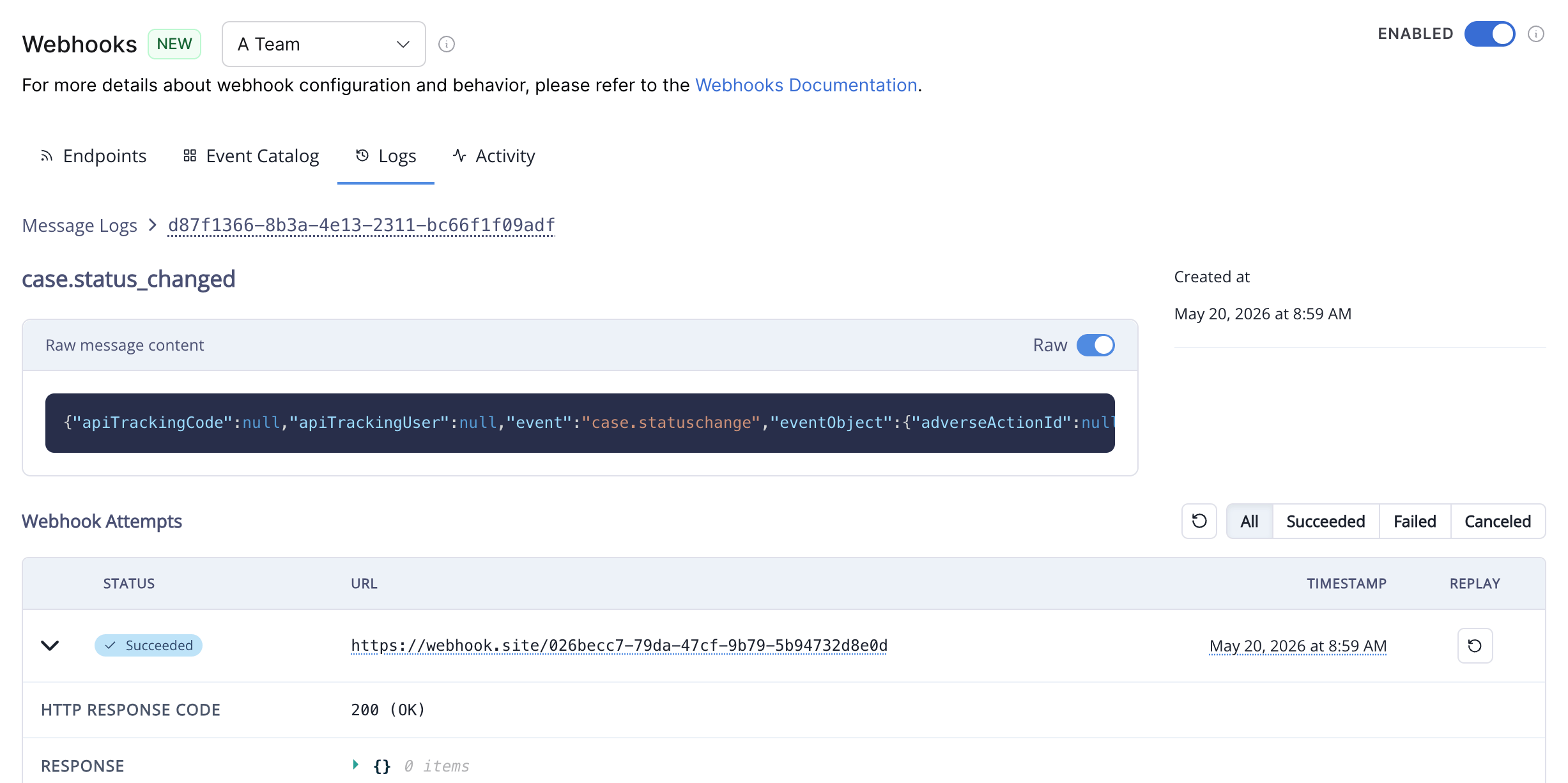
In the new Webhooks panel, the delivery log shows each event the new system sent, the response code from your receiver, and the payload. On your receiver, you should see two copies of each event arriving and your code processing both successfully.
### 3. Update signature verification
**This step is required for every endpoint, not just former username/password users.** Update your receiver to:
1. **Read the new headers** — `webhook-id`, `webhook-timestamp`, and `webhook-signature` — instead of the legacy `karmacheck-signature` header.
2. **Use the new signing secret** — each endpoint in the new system has its own `whsec_…` secret. Copy it from the endpoint's detail view in the dashboard; the legacy secret will not work.
3. **Verify with the new scheme** — HMAC-SHA256 over `..`, base64-encoded.
Replace any existing username/password check or legacy `karmacheck-signature` check with this verification — see [Verifying signatures](./webhooks-overview#verifying-signatures) in the Webhooks overview for a ready-to-use code sample.
### 4. Turn on the new delivery
Once your receiver is ready, flip the on/off switch on the **new** Webhooks panel to ON.
Your receiver will now get every event **twice** — once from the old system, once from the new one. This is intentional. Use this window to verify the new path is working.
### 5. Verify the new path is working
Trigger a test event you can observe end-to-end.
In the new Webhooks panel, the delivery log shows each event the new system sent, the response code from your receiver, and the payload. On your receiver, you should see two copies of each event arriving and your code processing both successfully.
 ### 6. Turn off the old delivery
Once you're confident the new system is working, flip the on/off switch on the **legacy** Webhooks panel to OFF. The new system is now your only delivery channel.
### 7. Remove the old endpoints
The old endpoints stay listed but no longer receive events. You can delete them whenever you're ready. Once they're all removed, the old panel disappears.
You're done.
## Rolling back
You can reverse any step except deleting the old endpoints:
* Pause the new delivery: flip the new panel's switch OFF.
* Resume the old delivery: flip the old panel's switch ON.
* Run both at once again: turn both switches ON.
Nothing is destroyed by toggling. The **Start Migration** button is also safe to click again — duplicate endpoints are skipped automatically.
## Common questions
The new infrastructure may not be enabled for your company yet. Contact your KarmaCheck point of contact.
**Yes.** The legacy `karmacheck-signature` HMAC is replaced entirely. The signature headers, the signed content, the encoding, the timestamp units, and the per-endpoint secret all change in the new system. See [What changes](#what-changes) for the side-by-side comparison.
Open the delivery log in the new panel. Most often, error responses mean your receiver is still expecting the old signature format or using the old signing secret. Confirm that the signature verification update — new `webhook-*` headers and the new `whsec_…` secret — has been deployed.
No. **Start Migration** copies all of your endpoints in a single step.
No, as long as you verify in the dual-delivery window before turning off the old system. Each system has its own delivery queue; events flow through whichever system is on at the moment they're emitted.
## Need help?
If anything in this guide doesn't match what you see in the dashboard, or if you hit an error during migration, contact KarmaCheck support — we'll walk through it with you.
### 6. Turn off the old delivery
Once you're confident the new system is working, flip the on/off switch on the **legacy** Webhooks panel to OFF. The new system is now your only delivery channel.
### 7. Remove the old endpoints
The old endpoints stay listed but no longer receive events. You can delete them whenever you're ready. Once they're all removed, the old panel disappears.
You're done.
## Rolling back
You can reverse any step except deleting the old endpoints:
* Pause the new delivery: flip the new panel's switch OFF.
* Resume the old delivery: flip the old panel's switch ON.
* Run both at once again: turn both switches ON.
Nothing is destroyed by toggling. The **Start Migration** button is also safe to click again — duplicate endpoints are skipped automatically.
## Common questions
The new infrastructure may not be enabled for your company yet. Contact your KarmaCheck point of contact.
**Yes.** The legacy `karmacheck-signature` HMAC is replaced entirely. The signature headers, the signed content, the encoding, the timestamp units, and the per-endpoint secret all change in the new system. See [What changes](#what-changes) for the side-by-side comparison.
Open the delivery log in the new panel. Most often, error responses mean your receiver is still expecting the old signature format or using the old signing secret. Confirm that the signature verification update — new `webhook-*` headers and the new `whsec_…` secret — has been deployed.
No. **Start Migration** copies all of your endpoints in a single step.
No, as long as you verify in the dual-delivery window before turning off the old system. Each system has its own delivery queue; events flow through whichever system is on at the moment they're emitted.
## Need help?
If anything in this guide doesn't match what you see in the dashboard, or if you hit an error during migration, contact KarmaCheck support — we'll walk through it with you.