> ## Documentation Index
> Fetch the complete documentation index at: https://developer.karmacheck.com/llms.txt
> Use this file to discover all available pages before exploring further.
# Webhooks
> How to subscribe to and handle KarmaCheck webhook events.
The KarmaCheck system emits events for different activities. To know when these events happen, you can use webhooks to get automatic updates. For instance, services performed by KarmaCheck involve different turnaround times, so you might want to receive real-time notifications about events related to each service. These notifications are sent as webhooks containing a JSON payload with information about the event. By subscribing to webhooks, you'll know when to fetch the latest data, enabling you to respond to events in real time.
This guide describes the current webhook delivery system. If you have legacy webhooks and wish to move over to the new system, see [Migrating your webhooks to the new infrastructure](./migrating-webhooks) to switch over.
## Subscriptions
You can set up a webhook for your company, which will deliver events for all groups within the company. If you need webhooks to be sent to different URLs for some or all groups, webhooks can also be configured for these individual groups. When a webhook is configured for a specific group, events for that group are sent to the group webhook subscription only and not the company webhook subscription.
You can subscribe to webhooks [in the KarmaCheck sandbox dashboard](https://app-stage.karmacheck.com/company-settings/webhooks). You will need the following information:
* **A URL** that's configured to handle incoming HTTPS POST requests. KarmaCheck will send notifications to this URL whenever relevant events occur.
* **The event types** that you want to subscribe to. See [Events](#events) for a list of supported events.
* **The group ID** of a group within your company *only if* you want to configure your webhook URL to receive events occurring for just that specific group. Unless specified, a webhook is usually configured to deliver events occurring for all groups within a company.
When you create a subscription, KarmaCheck generates a per-endpoint **signing secret**. Your receiver uses this secret to verify the authenticity of incoming requests. Store the secret securely (for example, in environment variables or a secrets manager) and never commit it to source control. For more information, see [Verifying signatures](#verifying-signatures).
The webhook subscription link above is for your sandbox account. Use the production domain to subscribe to webhooks in production.
### Webhook structure
All webhooks are delivered over HTTPS and include the following properties in a JSON payload:
```json theme={null}
{
"messageId": "string — the unique identifier of the event notification",
"event": "string — the webhook event being delivered",
"apiTrackingCode": "string | null — an identifier for tracking a case",
"apiTrackingUser": "string | null — an identifier for tracking a case",
"eventObject": "object — various properties with information related to the event"
}
```
The following is an example of a webhook request that you'll receive when an event occurs:
```shell theme={null}
POST /webhook-endpoint HTTP/1.1
host: example.com
content-length: 1902
user-agent: Svix-Webhooks/1.84.0
content-type: application/json
accept: */*
webhook-id: msg_3ErCD0YuVlJPXMDLSUg3PpMJGN5
webhook-timestamp: 1780927177
webhook-signature: v1,IMc336RAKV7xItISRHppXKlcGlyPW2kC1xwG/jOPB4g=
{
"messageId": "72fcd5f8-fb13-7de2-2152-e88e5257aff4",
"event": "case.statuschange",
"apiTrackingCode": null,
"apiTrackingUser": null,
"eventObject": {
...
}
}
```
Every webhook request includes the following HTTP headers, which your receiver uses to authenticate the request. See [Verifying signatures](#verifying-signatures) for how to use them.
| Header | Purpose |
| ------------------- | ----------------------------------------------------------------------------- |
| `webhook-id` | Unique message identifier (same ID if a message is retried) |
| `webhook-timestamp` | Timestamp in [seconds since epoch](https://en.wikipedia.org/wiki/Unix_time) |
| `webhook-signature` | Space-delimited list of versioned signatures, e.g. `v1,` |
### Verifying signatures
KarmaCheck signs every webhook delivery using **HMAC-SHA256** with the per-endpoint signing secret shown in your dashboard.
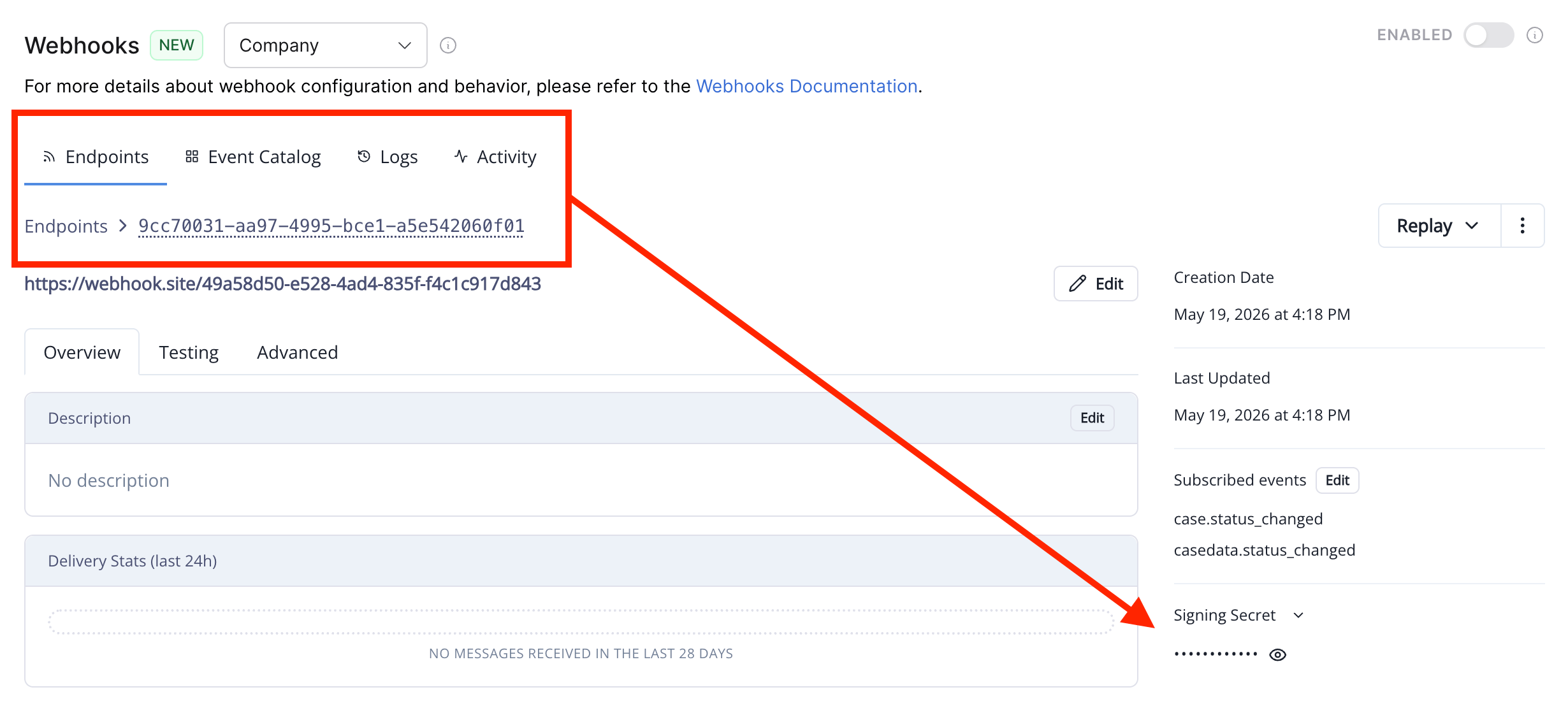 Verifying the signature confirms that each event genuinely came from KarmaCheck and hasn't been tampered with in transit.
To verify a request: concatenate the id, timestamp, and **raw** request body with `.` separators; HMAC-SHA256 that string using the base64-decoded portion of the signing secret (the part after `whsec_`); base64-encode the result; and compare it (in constant time) against each signature in the header, stripping the `v1,` prefix. Reject the message if no signature matches or if the timestamp is outside a small tolerance window (5 minutes is a reasonable default).
```typescript theme={null}
import crypto from "crypto";
const secret = process.env.KARMACHECK_WEBHOOK_SECRET!; // "whsec_..."
const TOLERANCE_SECONDS = 5 * 60;
function verify(webhookId: string, webhookTimestamp: string, webhookSignature: string, rawBody: string): boolean {
if (Math.abs(Date.now() / 1000 - Number(webhookTimestamp)) > TOLERANCE_SECONDS) return false;
const secretBytes = Buffer.from(secret.split("_")[1], "base64");
const expected = crypto
.createHmac("sha256", secretBytes)
.update(`${webhookId}.${webhookTimestamp}.${rawBody}`)
.digest();
return webhookSignature.split(" ").some((sig) => {
const received = Buffer.from(sig.split(",")[1] ?? "", "base64");
return received.length === expected.length && crypto.timingSafeEqual(received, expected);
});
}
```
Pass the raw request body bytes. JSON middleware that parses before your verification step may reorder keys or alter whitespace and break the signature. The header may contain multiple signatures during a key rotation window — accept if any one matches.
A couple of operational notes:
* **Store the signing secret in environment variables or a secrets manager.** Never hard-code or commit it.
* **Rotate secrets from the dashboard when needed.** During rotation, the system signs with both the old and new secret simultaneously; the verifier above already handles this by accepting either match.
### Responding to webhooks
To confirm receipt of a webhook, your webhook endpoint must respond with a 2*xx* HTTP status code as quickly as possible. Any response codes outside of this range, including 3*xx* codes, will indicate that you did not receive the webhook. Any other information returned does not get processed.
### Retries
If your endpoint doesn't return a 2xx response within 15 seconds, the delivery is considered failed and KarmaCheck will retry it on the following schedule:
| Attempt | Delay after previous attempt |
| ------- | ---------------------------- |
| 1 | Initial delivery |
| 2 | 5 seconds |
| 3 | 5 minutes |
| 4 | 30 minutes |
| 5 | 2 hours |
| 6 | 5 hours |
| 7 | 10 hours |
| 8 | 10 hours |
After 8 total attempts, retries stop.
## Events
The following events can trigger webhooks. KarmaCheck can configure webhooks to send either or both types of event notifications to your configured URL.
| Event | Description |
| -------------------------------------------------------------------------------------------------- | ------------------------------------------------ |
| [`case.statuschange`](/background-check-api/reference/webhooks/events/case-status-change) | The status of a case has changed. |
| [`casedata.statuschange`](/background-check-api/reference/webhooks/events/case-data-status-change) | The status of a service (case data) has changed. |
Additional events might be supported in the future. New event types will follow the same pattern as existing ones.
As a best practice, use all event notifications as indicators to fetch the latest data for a case or service. The sections below provide additional best practices for event handling.
### Order of events
Each supported event occurs multiple times during a case's lifecycle. As an example with the [`case.statuschange`](/background-check-api/reference/webhooks/events/case-status-change) event, the status of a case involving a candidate-provided PII flow could change like so:
| Event order | Case status | Description |
| ----------- | ------------------------------------------------------------------------ | --------------------------------------------- |
| 1 | `caseStatus`: "Pending" / `secondaryStatus`: "Waiting for Authorization" | Invitation sent to candidate |
| 2 | `caseStatus`: "Pending" / `secondaryStatus`: "Authorization in Progress" | Candidate started onboarding |
| 3 | `caseStatus`: "Pending" / `secondaryStatus`: null | Case is processing |
| 4 | `caseStatus`: "Complete" / `secondaryStatus`: null | Case is complete, with all screenings cleared |
**Out-of-order events:** Due to network latency and other factors that might affect delivery timing, KarmaCheck does not guarantee that you will receive notifications in the order that events occur. Therefore, your endpoint should not rely on the delivery of these events in the listed order. Instead, you should fetch the latest details of a case using `GET /case/id/{caseId}` whenever you receive the `case.statuschange` event.
### Duplicate events
Webhook endpoints might occasionally receive the same notification more than once if multiple events occur within a short period of time. One way to account for duplicate events is to log the events that you have processed so that you can avoid reprocessing them. For example, when receiving a `case.statuschange` event, compare the following properties to those of your logged events:
* **`id`:** The case ID
* **`caseStatusId` and `secondaryCaseStatusId`:** The case status
* **`modStamp`:** The timestamp for the case modification
### Missed events
Some issues that might occur, such as server errors, could lead to missed webhook notifications. To account for the possibility of missed events, you can build a function to check if a type of event notification hasn't been received for a specific length of time. When this happens, fetch the latest data related to the missed event.
KarmaCheck webhooks are powered by Svix. For more information, check out their [documentation](https://docs.svix.com/receiving/introduction).
Verifying the signature confirms that each event genuinely came from KarmaCheck and hasn't been tampered with in transit.
To verify a request: concatenate the id, timestamp, and **raw** request body with `.` separators; HMAC-SHA256 that string using the base64-decoded portion of the signing secret (the part after `whsec_`); base64-encode the result; and compare it (in constant time) against each signature in the header, stripping the `v1,` prefix. Reject the message if no signature matches or if the timestamp is outside a small tolerance window (5 minutes is a reasonable default).
```typescript theme={null}
import crypto from "crypto";
const secret = process.env.KARMACHECK_WEBHOOK_SECRET!; // "whsec_..."
const TOLERANCE_SECONDS = 5 * 60;
function verify(webhookId: string, webhookTimestamp: string, webhookSignature: string, rawBody: string): boolean {
if (Math.abs(Date.now() / 1000 - Number(webhookTimestamp)) > TOLERANCE_SECONDS) return false;
const secretBytes = Buffer.from(secret.split("_")[1], "base64");
const expected = crypto
.createHmac("sha256", secretBytes)
.update(`${webhookId}.${webhookTimestamp}.${rawBody}`)
.digest();
return webhookSignature.split(" ").some((sig) => {
const received = Buffer.from(sig.split(",")[1] ?? "", "base64");
return received.length === expected.length && crypto.timingSafeEqual(received, expected);
});
}
```
Pass the raw request body bytes. JSON middleware that parses before your verification step may reorder keys or alter whitespace and break the signature. The header may contain multiple signatures during a key rotation window — accept if any one matches.
A couple of operational notes:
* **Store the signing secret in environment variables or a secrets manager.** Never hard-code or commit it.
* **Rotate secrets from the dashboard when needed.** During rotation, the system signs with both the old and new secret simultaneously; the verifier above already handles this by accepting either match.
### Responding to webhooks
To confirm receipt of a webhook, your webhook endpoint must respond with a 2*xx* HTTP status code as quickly as possible. Any response codes outside of this range, including 3*xx* codes, will indicate that you did not receive the webhook. Any other information returned does not get processed.
### Retries
If your endpoint doesn't return a 2xx response within 15 seconds, the delivery is considered failed and KarmaCheck will retry it on the following schedule:
| Attempt | Delay after previous attempt |
| ------- | ---------------------------- |
| 1 | Initial delivery |
| 2 | 5 seconds |
| 3 | 5 minutes |
| 4 | 30 minutes |
| 5 | 2 hours |
| 6 | 5 hours |
| 7 | 10 hours |
| 8 | 10 hours |
After 8 total attempts, retries stop.
## Events
The following events can trigger webhooks. KarmaCheck can configure webhooks to send either or both types of event notifications to your configured URL.
| Event | Description |
| -------------------------------------------------------------------------------------------------- | ------------------------------------------------ |
| [`case.statuschange`](/background-check-api/reference/webhooks/events/case-status-change) | The status of a case has changed. |
| [`casedata.statuschange`](/background-check-api/reference/webhooks/events/case-data-status-change) | The status of a service (case data) has changed. |
Additional events might be supported in the future. New event types will follow the same pattern as existing ones.
As a best practice, use all event notifications as indicators to fetch the latest data for a case or service. The sections below provide additional best practices for event handling.
### Order of events
Each supported event occurs multiple times during a case's lifecycle. As an example with the [`case.statuschange`](/background-check-api/reference/webhooks/events/case-status-change) event, the status of a case involving a candidate-provided PII flow could change like so:
| Event order | Case status | Description |
| ----------- | ------------------------------------------------------------------------ | --------------------------------------------- |
| 1 | `caseStatus`: "Pending" / `secondaryStatus`: "Waiting for Authorization" | Invitation sent to candidate |
| 2 | `caseStatus`: "Pending" / `secondaryStatus`: "Authorization in Progress" | Candidate started onboarding |
| 3 | `caseStatus`: "Pending" / `secondaryStatus`: null | Case is processing |
| 4 | `caseStatus`: "Complete" / `secondaryStatus`: null | Case is complete, with all screenings cleared |
**Out-of-order events:** Due to network latency and other factors that might affect delivery timing, KarmaCheck does not guarantee that you will receive notifications in the order that events occur. Therefore, your endpoint should not rely on the delivery of these events in the listed order. Instead, you should fetch the latest details of a case using `GET /case/id/{caseId}` whenever you receive the `case.statuschange` event.
### Duplicate events
Webhook endpoints might occasionally receive the same notification more than once if multiple events occur within a short period of time. One way to account for duplicate events is to log the events that you have processed so that you can avoid reprocessing them. For example, when receiving a `case.statuschange` event, compare the following properties to those of your logged events:
* **`id`:** The case ID
* **`caseStatusId` and `secondaryCaseStatusId`:** The case status
* **`modStamp`:** The timestamp for the case modification
### Missed events
Some issues that might occur, such as server errors, could lead to missed webhook notifications. To account for the possibility of missed events, you can build a function to check if a type of event notification hasn't been received for a specific length of time. When this happens, fetch the latest data related to the missed event.
KarmaCheck webhooks are powered by Svix. For more information, check out their [documentation](https://docs.svix.com/receiving/introduction).